
Is WordPress slow to load? Here's a trick to fix it, including the WP Rocket plugin.
WordPress + WordPress is notoriously slow. Even setting aside product details, just editing the backend causes CPU usage to spike constantly. How can this be resolved? We recommend using the WP Rocket caching plugin to statically load pages, achieving millisecond-level caching speeds.

Read the tutorial first, then download.
Configure WP Rocket
Step 1: Caching
Go to Settings > WP Rocketthe left-hand menu and click Cache :
Ensure that only " Enable caching for mobile devices" is active.
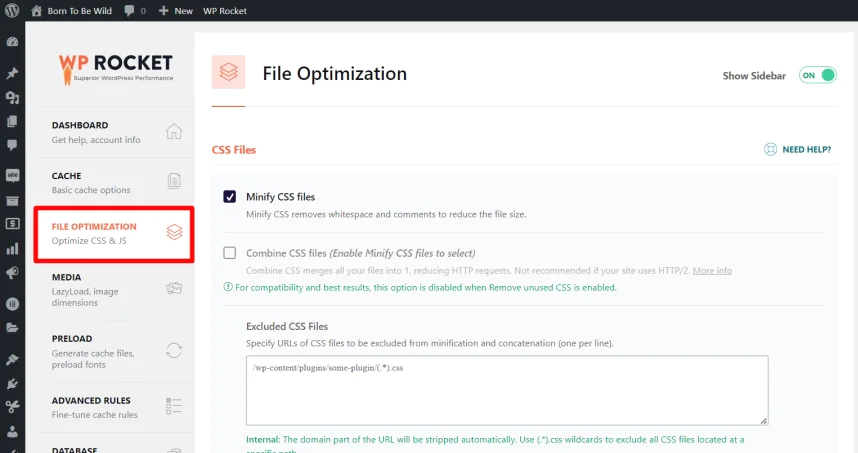
Under the heading of the CSS file :
a) Enable minimized CSS files b) Enable optimized CSS delivery

In the excluded CSS files :
CommerceKit - Order Collision Packaging
Under the CSS safe list :
After enabling "Optimize CSS Delivery", you need to exclude the following for the product library to function correctly:
(.*).swiper-wrapper(.*)
In the JavaScript file :
a) Enable lazy loading of JavaScript and exclude:
/jquery-?[0-9.](.*)(.min|.slim|.slim.min)?.js
b) Enable delayed JavaScript execution ; leave the rest as is.

Step 3: Media
Click the "Media" tab. Ensure the following settings are all enabled:
a) Enable image b) Add missing image dimensions
Add the following to the excluded image or iframe : custom-logo

Step 4: Advanced Rules
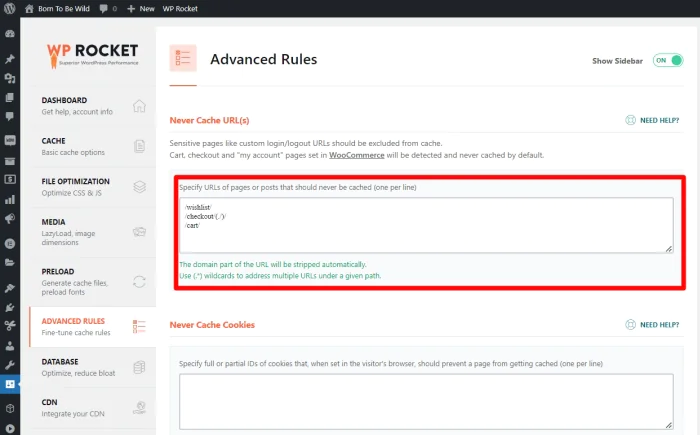
The final configuration step is to whitelist pages that should be excluded from caching—such as shopping carts, checkout, and wish lists. Go to the "Advanced Rules" tab and add these URLs.
Please note that these URLs may differ on your own website (for example, if your store is not in English), so please check them carefully.
/wishlist /cart /checkout/(./)/
If you have modified the checkout or shopping cart page, please change it accordingly.
Step 5: Test using PageSpeed
After completing these steps, open your website in an incognito browser and clear the cache first. Then test it in Google PageSpeed .
After applying the above configuration settings on the "basic" network host, our scores are as follows.